Pricing & RevenueEstimated monthly revenue by grade
Revenue below is calculated from the Payment Link Amounts further down this page (the prices families actually pay), minus each player's discount. Change prices there only.
Payment Link AmountsWhat families are charged
What "Send Payment Link" actually charges. Change these here whenever the season's rate changes — no code update needed. The first payment is automatically prorated for however many Tuesday/Thursday practices are left in the current month; the kit fee (if included) is a one-time add-on on top of that.
Proration ModeHow the first month is calculated
While locked, the "this month" amount is fixed the moment you click Send Link — so a family that pays a few days late still owes what was shown to them, instead of a smaller amount recalculated at payment time. Turn this off once initial enrollment settles, so new signups pay live based on practices left as of the moment they actually pay.
One-Time PaymentsTournament fees, extra kits, one-off charges
Create a stand-alone payment link for a single charge — a tournament fee, a replacement kit, a test charge, anything that isn't a recurring membership. Not tied to any registration or subscription; the family just pays this one amount once.
Reset Payment StatusStart a fresh billing month
For the start of a new billing month (e.g. November 1st, after last month's links have expired). Sets everyone's Payment Status back to "Not sent", cancels any unpaid links that are still open, and clears every "Paid otherwise" mark so you can send fresh links at the new price. Active Stripe subscriptions are not touched. Can only be used once per calendar month.
Charges
Recurring charges apply to every month automatically (field rental, insurance, etc.). One-time charges apply only to the month you tag them with (a tournament fee, equipment purchase, etc.). Both are subtracted from estimated roster revenue in each month's snapshot, under Data.
Our Coaches
President
General Manager
Head Coaches
Coaches
Volunteers
Responsibilities

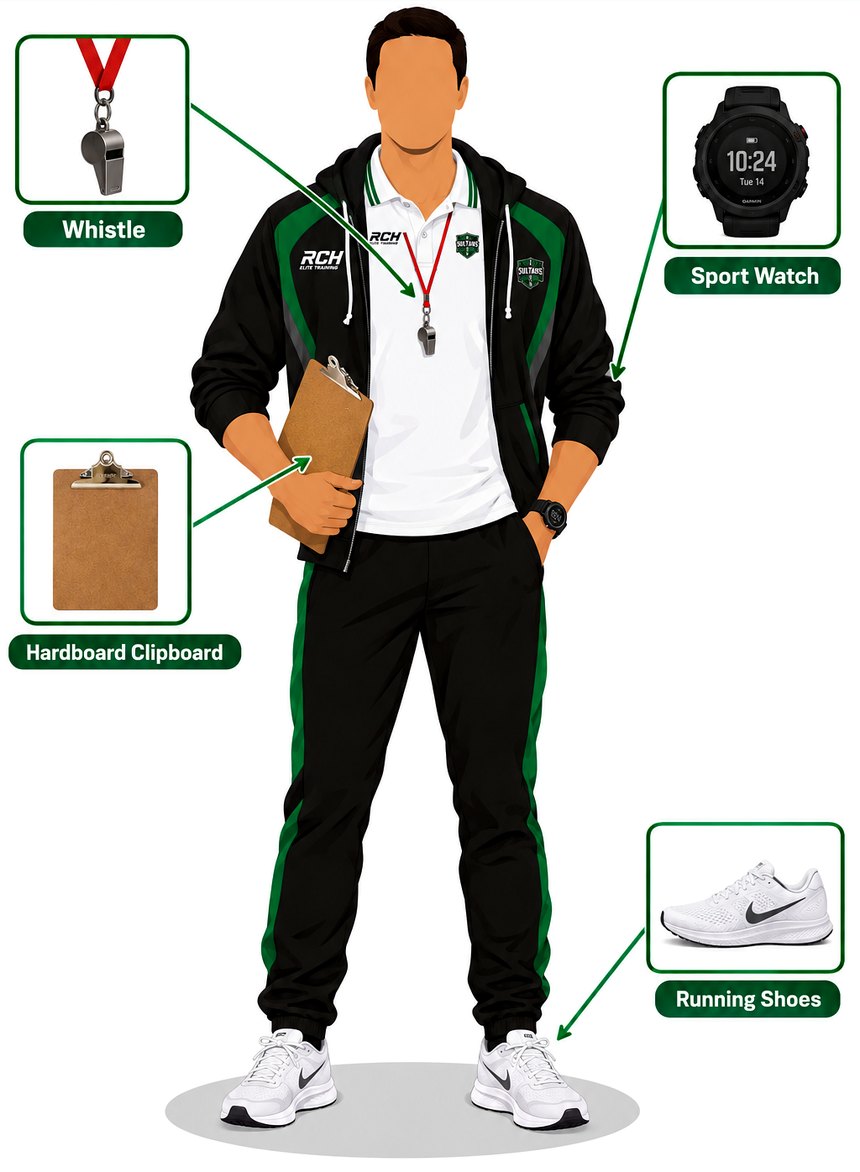
- Jacket and polo. RCH Elite Training jacket over the white RCH polo.
- Track pants. Black pants with the green side stripes.
- Whistle. Worn around the neck on the red lanyard.
- Sport watch. To keep time during practice.
- Hardboard clipboard. For attendance and your coaching summary.
- Running shoes. Clean, white, and ready to move.
Passion
Bring energy and love for the game to every practice.
Discipline
Be on time, prepared, and consistent in everything you do.
Follow the Curriculum
Teach the plan as written, in order, every practice.
Connect
Build a real connection with the child and with the parent.
Taken at the very start of practice.
Start of practiceEvery practice opens with running, as laid out in the curriculum.
Circle the players and summarize what will be done today (see the curriculum).
Run the curriculum exercises and coaching steps. Follow your coaching summary, available in the Calendar.
End the main work with 1 v 1, as laid out in the curriculum.
Review the practice, praise the players, and wrap up (see the curriculum).
Speak with the parents, as laid out in the curriculum.
Taken again at the end of practice.
End of practice- Term reports. At the end of each term, write a report on each child.
- Players' outside activities. Attend your players' outside activities.
- Parents' outside activities. Attend the parents' outside activities.
- Camps. Attend camps if needed.
- Full-time coaches. Attend their one-to-one and school coaching (currently unavailable).
- Coaches meeting. Attend the coaches meeting with Coach Ismail.
Our Curriculum
Practice Field
How we stay organized at practice: one field, four zones, one coach per zone, and Coach Ismail checking on everybody. Parents and supplies stay at the canopy behind the top goal.
Student Report
Write a report for a parent
Pick the grade, the child, the term and the chapters, write the report, and it is emailed to the parent as a PDF with the child's name, the month and the year.
Recent reports
Notice
Write a notice for a parent
Pick the child, choose what it is about, and write the notice. It is emailed to the parent, or you can save it without sending.
Recent notices
Documents
AttendanceMonthly practice sheets, PDF
One page per grade for the month, listing every Tuesday and Thursday practice. Each player gets an open box on each day they train: two boxes a week for two-session players, one box a week (their Tuesday or Thursday) for one-session players. Days a player does not train are greyed out. Online-course players show with all days greyed.
RCH Calendar
Add event
Shop
Draft shop: no payments are connected yet. When the switch is off, the website's Shop tab says the shop is currently unavailable. While it is on but you have not added products, the website shows clearly marked sample products.
Page photos
These photos fade in the background behind "The RCH Shop" title. Each product also has its own photos (up to 8) when you add or edit it.
Camp
Add a summer or winter camp when it is ready. When the switch is off, the website's Camp tab says camps are currently unavailable. Registration and payment are not connected yet.
Page photos
The background photos fade behind the "RCH Camps" title; the camp life photos appear in a strip at the bottom of the page. Each camp also has its own photos (up to 8) when you add or edit it.
Monthly ReportPDF report, emailed on the 1st
A full PDF dashboard report — roster counts, Season Overview, Final Net Revenue, one-time payments, business charges, and current coaches — is emailed automatically on the 1st of each month for the month that just ended. Use the buttons below to preview the current month any time, or to resend/send early.
Monthly SnapshotsSaved roster and revenue, month by month
A snapshot of the roster + estimated revenue, charges, and net income is saved automatically on the 1st of each month for the month that just ended. Revenue is estimated from each active player's current monthly rate minus their discount — it's a projection from the roster, not a reconciliation against actual settled Stripe payments, which Stripe's own dashboard remains the source of truth for.
Signed AgreementsE-signed PDFs on file
Use Send Agreement on a registration or roster row to email the family an e-sign link. Once they fill in the form and sign, the signed PDF is stored here and a copy is emailed to them and to you.
ReviewsAsk families for a star rating
Emails a thank-you for trusting RCH Elite Training and asks for a 1 to 5 star rating plus a comment. Send it to one player, a whole grade, RCH only, Sultans only, or everyone. Families with several children get one email.
What Can We Change?Ask families for service feedback
Emails families asking what we should change in our services. Works the same way as Reviews: pick who gets it, and their answers show up here.
Unsubscribed PlayersArchived players who quit
Players who quit. Cancel their billing first (from the Players Roster), then Unsubscribe them here to archive them off the active roster.